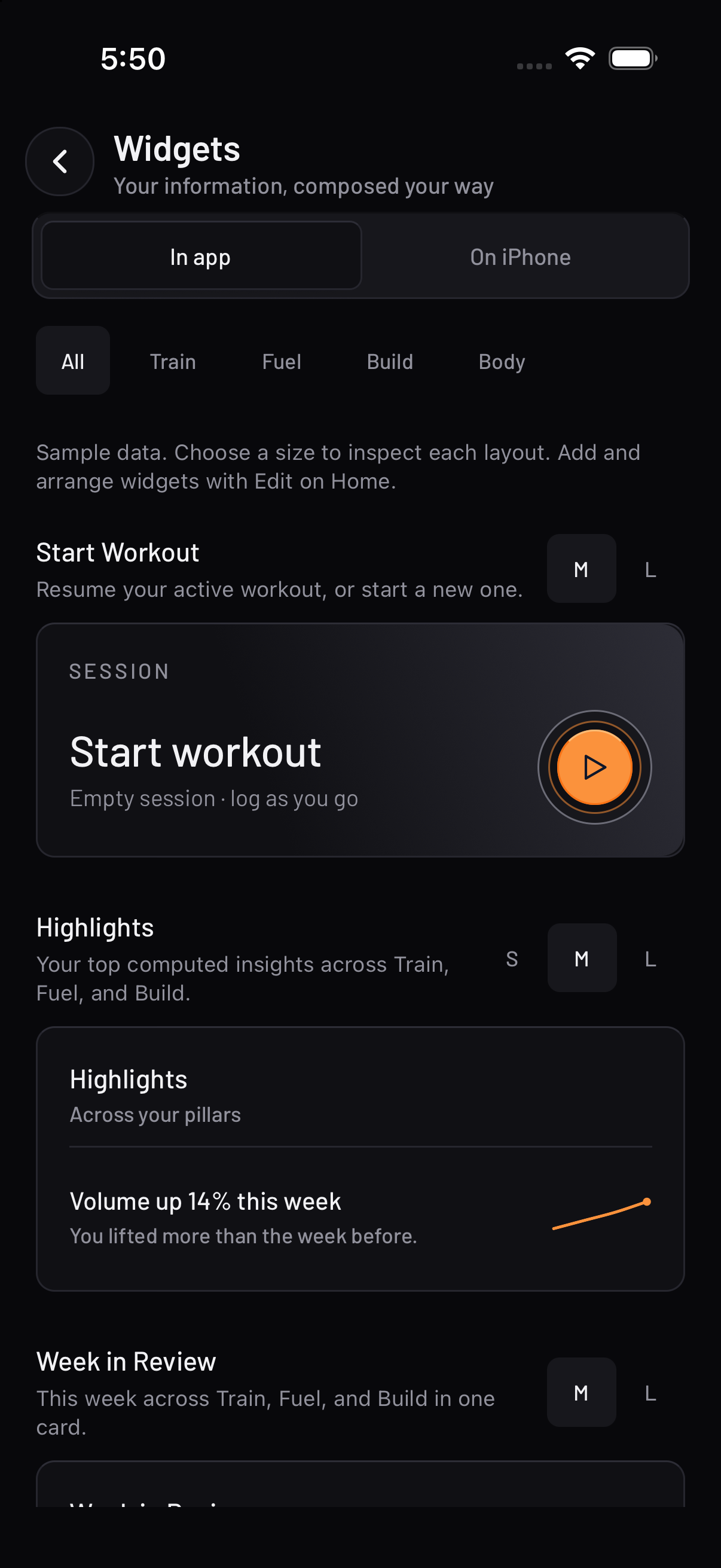
Your information, composed.Train, Fuel and Build in instruments that stay quiet until you need them. Actual app capture · demo data.Inspect the widget system ↗
Pillar 1 of 3
Train
A strength log that shows you what the work actually did.
Recovery
See the muscles you have trained and the time since their last session.
Workout
Log each set, with the weight, reps and rest timer together.
~870 ~870
exercises, with faceted search and your own custom entries
8 + 5
logging types and set types, supersets and dropsets included
8
rank tiers per exercise, from Bronze to PEAK, normalised for bodyweight
2
calculators — plate maths and warm-up ramps, worked out for you
Ranks are computed from your own estimated one-rep max. No percentiles, no leaderboards. Stop training a lift and it goes quiet and keeps its peak — it is never marked down.
Intake tracking with the reasoning attached to every target.
Scan
One lens for barcodes and nutrition labels. Scanning runs on your phone.
9:41
Scan food
Nutrition Facts
Serving size 1 bar (45 g)
Calories210
Total Fat8 g
Carbohydrate24 g
Protein12 g
Point at a barcode, label, or menu
Nutrition label found
Tap to capture — or hold steady
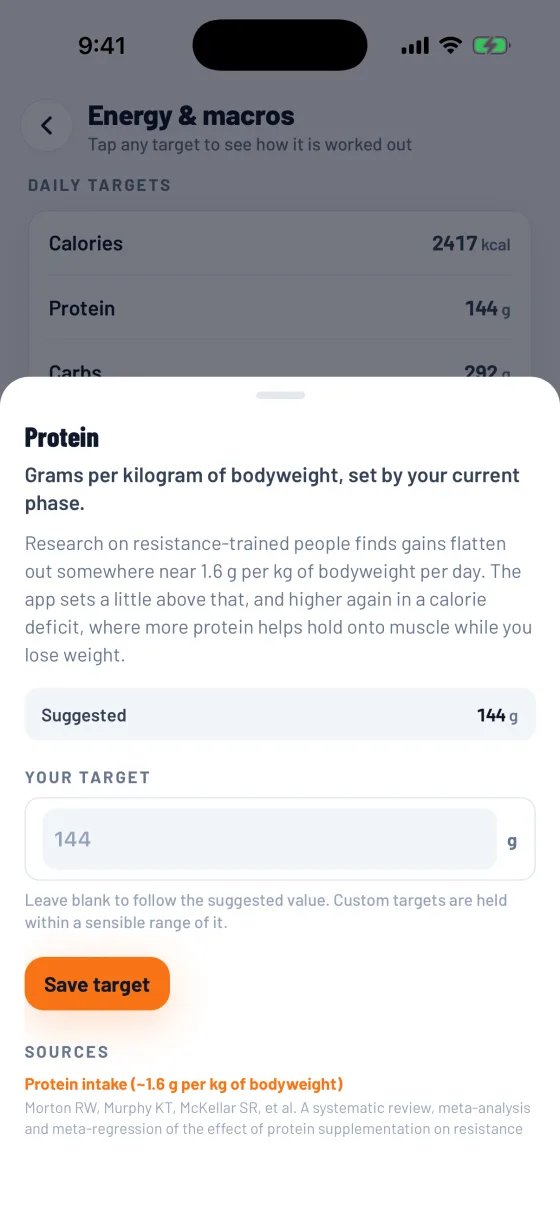
Targets
Open a nutrition target to see its reasoning, sources and your own override.
2
open databases behind it — USDA FoodData Central and Open Food Facts
~30 ~30
micronutrients, each with its derivation and a real citation
21,209 21,209
menu items across 96 restaurant chains
0
photos uploaded — barcode and label scanning run on your device
Scanning is unlimited on every tier, including free, because it runs on your phone rather than on a server we pay for. Exercise calories never enter the budget, and no food gets a verdict.
Pillar 3 of 3
Build
Habits you design, at a cadence you pick.
Habits
Your habits, their cadence and today’s check-ins in one place.
5
cadences — daily, chosen days, N times a week or month, every N days
1
momentum score that dips when you miss and never resets to zero
0
fixed challenges, 21-day plans or prescribed quests
—
habits you are dropping, tracked as days clean instead
Stacks chain a new habit onto an anchor you already keep. A missed day is recorded and left alone — there is no scolding, and no consolation either.
9:41
Scan food
Nutrition Facts
Serving size 1 bar (45 g)
Calories210
Total Fat8 g
Carbohydrate24 g
Protein12 g
Point at a barcode, label, or menu
Nutrition label found
Tap to capture — or hold steady
01 — At the bar
Pick the weight. See the plates.
One less calculation between sets. Change the target and see exactly what goes on each side.
Try the app’s plate calculator here. Switch between kilograms and pounds, or move through the weights with the slider.
Mifflin MD, St Jeor ST, Hill LA, Scott BJ, Daugherty SA, Koh YO. A new predictive equation for resting energy expenditure in healthy individuals. Am J Clin Nutr. 1990;51(2):241-247.
Morton RW, Murphy KT, McKellar SR, et al. A systematic review, meta-analysis and meta-regression of the effect of protein supplementation on resistance training-induced gains in muscle mass and strength. Br J Sports Med. 2018;52(6):376-384. Benefits plateau around ~1.6 g/kg/day for most trainees.
Schoenfeld BJ, Ogborn D, Krieger JW. Dose-response relationship between weekly resistance training volume and increases in muscle mass: a systematic review and meta-analysis. J Sports Sci. 2017;35(11):1073-1082. ~10+ hard sets/muscle/week trends toward more growth, with diminishing returns.
Lally P, van Jaarsveld CHM, Potts HWW, Wardle J. How are habits formed: modelling habit formation in the real world. Eur J Soc Psychol. 2010;40(6):998-1009. Automaticity took a median of 66 days (range ~18–254) — not "21 days."
03 — Privacy
Quiet by default
Your training, food and habit data is written to your device first. Turn on cross-device
sync and it’s also stored with our backend provider under row-level security, reachable
only by your authenticated account.
01 No ads, and no advertising SDKs.
02 Nothing sold or shared for cross-context advertising, to anyone, ever.
03 Your data is never used to train a model, and no third-party model is used.
04 Product analytics are off until you turn them on, and carry no device or account identifier.
05 Barcode and label scanning happens on your device; those photos are never uploaded.
06 Apple Health readings stay on your device and are never sent to our servers.
07 Export to CSV, and delete everything, whenever you want.
The specifics — including what our providers see and where they are — are in the
Privacy Policy.
04 — Cost
Priced, and honest about it
Nothing is charged until the app is publicly released, and the price shown at the moment
you buy is the one that applies.
Free
$0
Stays free.
Workout logging, routines, habits and streaks
Charts, ranks and coverage analysis
Barcode and label scanning, unlimited
Cross-device sync and CSV export
Pro
$69.99/year
Or $11.99 a month. Auto-renews until you cancel in your store account.
Everything in Free
Composed habit cadences — a weekday mask with a count, every other week, month days
Up to three reminder times per habit
Cross-pillar bindings, so a habit fills itself from what you log
How the pricing works
What runs on your phone is unlimited
Logging, routines, habits, streaks, charts, ranks, coverage analysis and scanning all run on your device. They cost us nothing per person, so they are not metered — on any tier. What runs on servers we pay for by the request is the only thing that ever carries a limit.
A gate covers authoring, never evaluation
Paid features decide whether you can build or edit something — never whether what you already built keeps working. If a subscription lapses, your existing setup keeps running and only the editor locks.
Paid adds, it does not carve out
Nothing that works today moves behind a payment later. When the first paid feature shipped, the free tier got better in the same release. Your progress is yours, and is never held back to make a point.
The price funds the work
There are no investors to repay and no advertising. Every exercise is individually researched and written up rather than scraped, and that is an ongoing cost. We commit at least a quarter of subscription revenue to product development each year.
05 — Roadmap
iPhone first. The rest pays its way.
ReInvent ships in order. Each step starts when the one before it can pay for it, so
nothing below is promised on a date.
01 Next
Step 1: iPhone
ReInvent launches on the App Store first, with everything on this page: Train, Fuel and Build, and the Free and Pro plans.
Waiting on the App Store listing.
02 After iPhone
Step 2: Android
The Android app already runs in internal testing. It goes to Google Play once early revenue covers the Google Maps service its restaurant maps depend on.
Starts with the first revenue from the iPhone release.
03 Funded by revenue
Step 3: Paid for by revenue
Some features cost money every time they run: licensed data, server time, model usage. They arrive as income can cover them, not before.
Improved workoutsDeeper training tools, built on the logging that ships at launch.
A larger food databaseLicensed nutrition data, restaurant menus included, beyond the free public sources used now.
AI meal scanningPhotograph a plate to start an entry you can check and correct.
Plan builderHelp laying out a training plan from your goals and schedule, with AI assistance added later.
AI coachQuestions about your own training, food and habits, answered from what you log.
Built in roughly this order, as revenue allows.
Later: Meal plan helper, planning meals ahead, after the features above.
No dates, and none of these are in the app yet. If the order changes, this list changes with it.
Status
Not out yet.
ReInvent launches on iPhone first, and Android follows on Google Play soon after. There
is nothing to download today — this page is where the links will appear.